> ## Documentation Index
> Fetch the complete documentation index at: https://docs.blink.cash/llms.txt
> Use this file to discover all available pages before exploring further.
# Architecture Overview
> How Blink deposit flows work. The signed-link model, data flow, and component responsibilities.
Blink deposit flows use a **signed-link model**. Your server signs each payment request with your private key. Blink verifies it with the public key you registered, ensuring every payment was authorized by you.
## Deposit flow
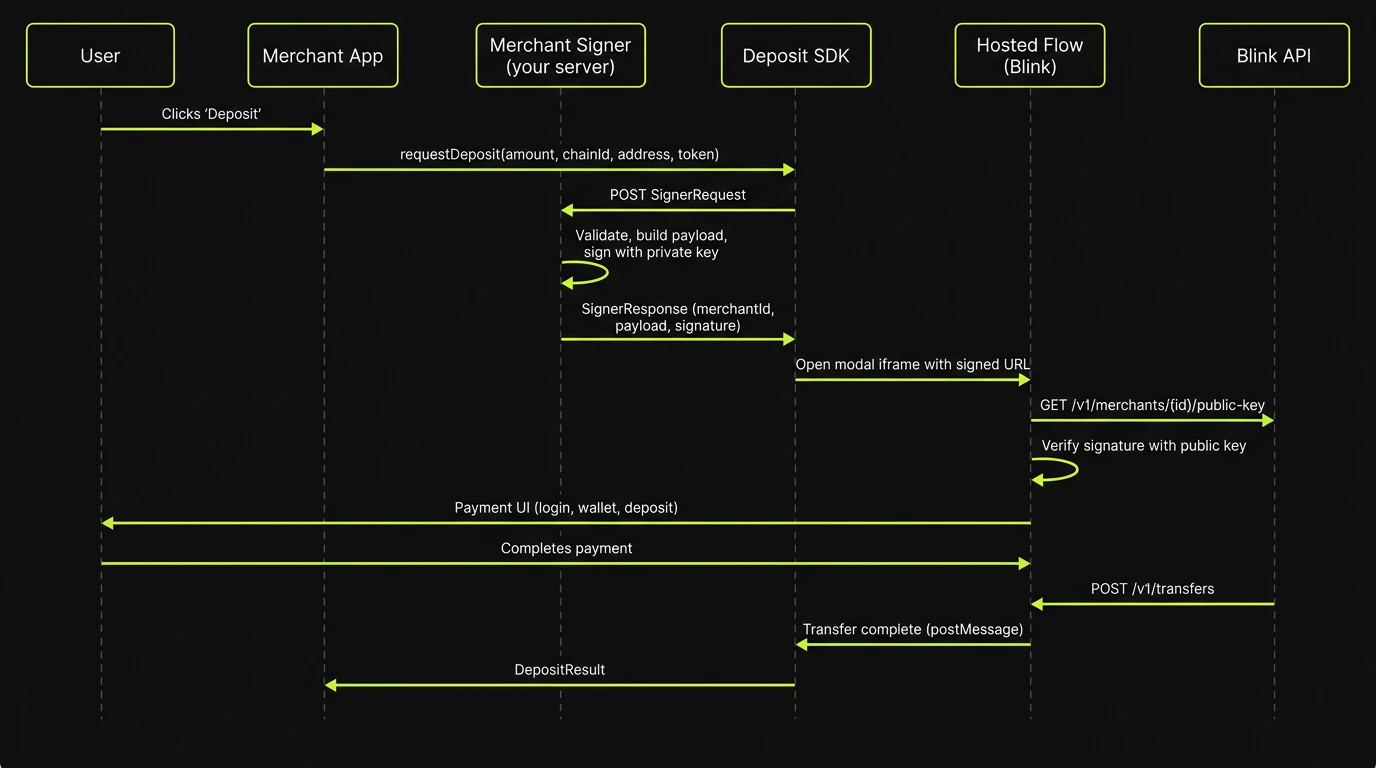 The flow above shows the web integration. For **mobile apps**, the Mobile Deposit SDK (`@swype-org/deposit-mobile`) follows the same signed-link model but opens the hosted flow in an in-app browser instead of an iframe, and receives the result via a deep link callback instead of `postMessage`. See [Integrate the Mobile Deposit SDK](/integration/deposit-mobile-sdk) for details.
## Components
### Your side
| Component | Runs on | Responsibility |
| ------------------- | ----------- | ------------------------------------------------------------------------------------------------------------------------------------------------------------- |
| **Merchant App** | Browser | Your frontend. Calls `requestDeposit()` on the Deposit SDK when the user wants to pay. |
| **Merchant Signer** | Your server | Validates payment requests, generates an idempotency key, builds a JSON payload, signs it with your ECDSA P-256 private key, and returns the signed response. |
### Blink side
| Component | Runs on | Responsibility |
| --------------- | --------------------- | ------------------------------------------------------------------------------------------------------------------------------------------- |
| **Deposit SDK** | Browser (in your app) | Orchestrates the signer call, opens the iframe, and listens for the completion `postMessage`. Published as `@swype-org/deposit`. |
| **Hosted Flow** | Browser (iframe) | Blink's payment UI. Verifies the merchant signature, authenticates the user, handles wallet connection, and executes the on-chain transfer. |
| **Blink API** | Server | Stores merchant public keys, creates transfers, manages wallets and accounts. |
## Security model
1. **Private key stays on your server.** The Deposit SDK never sees your private key. It only receives the signed payload from your signer endpoint.
2. **Blink verifies every payment.** The hosted flow fetches your registered public key and verifies the ECDSA signature before showing any payment UI. A forged or tampered payload is rejected.
3. **Idempotency keys prevent duplicates.** Each signer response includes a unique UUID. If the same idempotency key is submitted twice, the second transfer is rejected.
4. **Short-lived links.** The signed payload includes a `signatureTimestamp`. Blink enforces a maximum signature age of 15 minutes server-side. Expired links are rejected automatically.
## Iframe lifecycle
On desktop viewports (wider than 480px), the transfer renders as a centered modal (460px wide, 680px tall) with a backdrop blur overlay. On mobile viewports (480px or narrower), it renders full-screen for an app-like experience.
The iframe has WebAuthn permissions (`publickey-credentials-get` and `publickey-credentials-create`) so passkey ceremonies work cross-origin. The user only leaves your page to create a passkey when the browser blocks cross-origin iFrame passkey creation and to connect their mobile wallet.
When the user completes payment, the hosted flow sends a `blink:transfer-complete` postMessage. The SDK validates the origin, acknowledges receipt, closes the iframe, and resolves the `requestDeposit()` promise.
The flow above shows the web integration. For **mobile apps**, the Mobile Deposit SDK (`@swype-org/deposit-mobile`) follows the same signed-link model but opens the hosted flow in an in-app browser instead of an iframe, and receives the result via a deep link callback instead of `postMessage`. See [Integrate the Mobile Deposit SDK](/integration/deposit-mobile-sdk) for details.
## Components
### Your side
| Component | Runs on | Responsibility |
| ------------------- | ----------- | ------------------------------------------------------------------------------------------------------------------------------------------------------------- |
| **Merchant App** | Browser | Your frontend. Calls `requestDeposit()` on the Deposit SDK when the user wants to pay. |
| **Merchant Signer** | Your server | Validates payment requests, generates an idempotency key, builds a JSON payload, signs it with your ECDSA P-256 private key, and returns the signed response. |
### Blink side
| Component | Runs on | Responsibility |
| --------------- | --------------------- | ------------------------------------------------------------------------------------------------------------------------------------------- |
| **Deposit SDK** | Browser (in your app) | Orchestrates the signer call, opens the iframe, and listens for the completion `postMessage`. Published as `@swype-org/deposit`. |
| **Hosted Flow** | Browser (iframe) | Blink's payment UI. Verifies the merchant signature, authenticates the user, handles wallet connection, and executes the on-chain transfer. |
| **Blink API** | Server | Stores merchant public keys, creates transfers, manages wallets and accounts. |
## Security model
1. **Private key stays on your server.** The Deposit SDK never sees your private key. It only receives the signed payload from your signer endpoint.
2. **Blink verifies every payment.** The hosted flow fetches your registered public key and verifies the ECDSA signature before showing any payment UI. A forged or tampered payload is rejected.
3. **Idempotency keys prevent duplicates.** Each signer response includes a unique UUID. If the same idempotency key is submitted twice, the second transfer is rejected.
4. **Short-lived links.** The signed payload includes a `signatureTimestamp`. Blink enforces a maximum signature age of 15 minutes server-side. Expired links are rejected automatically.
## Iframe lifecycle
On desktop viewports (wider than 480px), the transfer renders as a centered modal (460px wide, 680px tall) with a backdrop blur overlay. On mobile viewports (480px or narrower), it renders full-screen for an app-like experience.
The iframe has WebAuthn permissions (`publickey-credentials-get` and `publickey-credentials-create`) so passkey ceremonies work cross-origin. The user only leaves your page to create a passkey when the browser blocks cross-origin iFrame passkey creation and to connect their mobile wallet.
When the user completes payment, the hosted flow sends a `blink:transfer-complete` postMessage. The SDK validates the origin, acknowledges receipt, closes the iframe, and resolves the `requestDeposit()` promise.